
LEGO® 75980 CONVERSION BETA
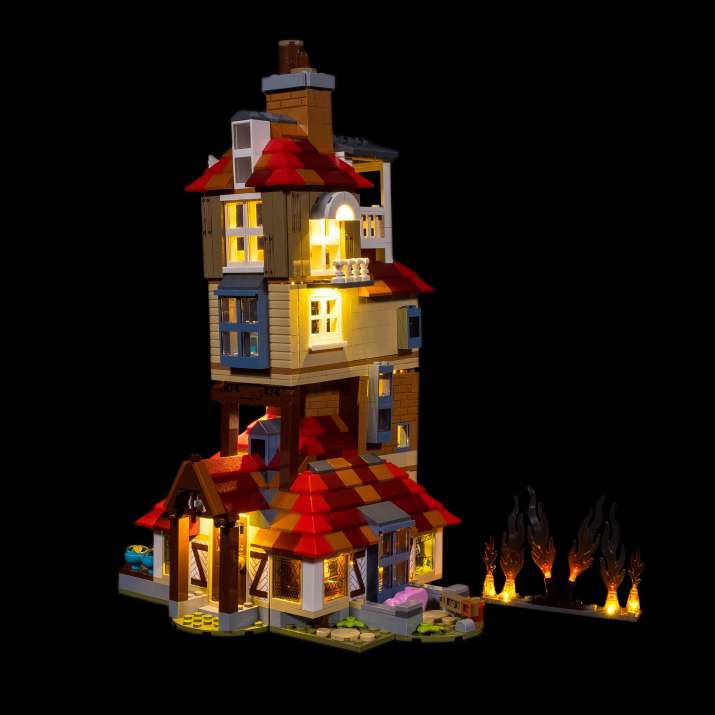
Harry Potter Attack On The Burrow
An independently prepared component plan based on the original Light My Bricks 1.0 inventory.
75980-beta.2 · Source checked 2026-10-29 · Physical installation untested
READ BEFORE ORDERING
THIS BUILD.
THE IMPORTANT DETAILS.
- Source inventory marks spares for White 30cm Bit Light but does not identify the installed count. The plan conservatively retains all 9 units; check the blueprint before reducing them.
- Source inventory marks spares for White 30cm Micro Bit Light but does not identify the installed count. The plan conservatively retains all 7 units; check the blueprint before reducing them.
- Source inventory marks spares for 8-Port Expansion Board but does not identify the installed count. The plan conservatively retains all 2 units; check the blueprint before reducing them.
- 5 Dock housings need new Tether attachment locations. Check the stud footprint, housing clearance and access to both Belt sockets at each original board location before buying.
- This kit uses 1 FX Spectrum controller(s). Select the matching mode and connect only the intended fixtures to effect outputs. The original effect timing is not reproduced exactly. Mounting needs 3×3 studs and 17 mm clearance; preserve access to the dial.
- Capacity allowance: 19 Astro light/string connectors across 39 Dock Astro ports. This checks total capacity only. Assign lights by their actual locations and confirm each Dock’s local capacity and lead reach before buying.
- This is an independently derived component plan, not a physically tested installation or a replacement step-by-step instruction manual. Use the original guide together with the concordance and changed mounting/power plan.
Connection counts are a planning check. They do not verify local grouping, cable reach, power draw or physical fit. Astro ports and Belt sockets are different connections.
How the cable allowance was calculated
7 network components require at least 6 Belt links in this planning allowance. Original cable lengths are retained where mapped; included FX Belts are credited once. Extra links use 50 cm Belts as an unmeasured routing allowance. Check the actual branch and effect grouping against every source step.
THE CONCORDANCE
EVERY CHANGE.
IN PLAIN SIGHT.
Quantities below are individual components. The shopping list combines shared packs, then rounds up once.
| Original 1.0 item | Proposed 2.0 replacement | What to check |
|---|---|---|
| 9 x White 30cm Bit Light | 9 × Astro Light Regular - White 30cm ↗ | Keep one light at each original fixture. Route the flat lead without pinching it and confirm that its 30 cm lead reaches the chosen Dock. |
| 1 x Green 30cm Bit Light | 1 × Astro Light Regular - Green 30cm ↗ | Keep one light at each original fixture. Route the flat lead without pinching it and confirm that its 30 cm lead reaches the chosen Dock. |
| 7 x White 30cm Micro Bit Light | 7 × Astro Light Micro - Cool White 30cm ↗ | Keep one light at each original fixture. Route the flat lead without pinching it and confirm that its 30 cm lead reaches the chosen Dock. White is substituted with cool white; appearance may differ. |
| 2 x White 15cm Micro Bit Light | 2 × Astro Light Micro - Cool White 15cm ↗ | Keep one light at each original fixture. Route the flat lead without pinching it and confirm that its 15 cm lead reaches the chosen Dock. White is substituted with cool white; appearance may differ. |
| 1 x 6-Port Expansion Board | 1 × Dock 6 ↗ | Astro ports are separate from the two Belt sockets. Mount the larger 2.0 housing with its included Tether; check the 1.0 board location has clearance. |
| 2 x 8-Port Expansion Board | 2 × Dock 9 ↗ | Astro ports are separate from the two Belt sockets. Mount the larger 2.0 housing with its included Tether; check the 1.0 board location has clearance. |
| 1 x Micro 4-Port Expansion Board | 1 × Dock 6 ↗ | Astro ports are separate from the two Belt sockets. Mount the larger 2.0 housing with its included Tether; check the 1.0 board location has clearance. |
| 1 x Micro 8-Port Expansion Board | 1 × Dock 9 ↗ | Astro ports are separate from the two Belt sockets. Mount the larger 2.0 housing with its included Tether; check the 1.0 board location has clearance. |
| 1 x Flicker Effects Board | 1 × FX Spectrum ↗ | Use FX Spectrum with the closest appropriate mode: Elements for fire/flicker, Pulse, Gun, Emergency, Spooky, Sequence, Traffic or Glitter. Timing and output groups differ from 1.0. Each includes one 15 cm Belt and a 3×3 Tether. |
| 2 x 5cm Connecting Cables | 2 × Belt 5cm ↗ | Preserves the original nominal cable length. Belt plugs and routes differ; measure reach including bends before ordering. |
| 1 x 15cm Connecting Cables | No separate purchase | Preserves the original nominal cable length. Belt plugs and routes differ; measure reach including bends before ordering. 1 of these 15 cm Belts are supplied with the FX Spectrum controllers and deducted from standalone purchases. |
| 1 x 30cm Connecting Cable | 1 × Belt 30cm ↗ | Preserves the original nominal cable length. Belt plugs and routes differ; measure reach including bends before ordering. |
| 1 x USB Power Cable | No separate purchase | Power changes to a 60 cm USB Flux Belt and separately purchased manufacturer-specified 5V/2.4A supply. Old battery/USB alternatives are not added twice. |
| 2.0 effect branch distribution | 1 × Split Dock ↗ | Each Split Dock has four Belt sockets: incoming power, effect-controller branch and onward trunk leave one spare. Keep steady lights off effect outputs. |
| Additional 2.0 links | 2 × Belt 50cm ↗ | 7 power-network components need at least 6 links. 3 source-length Belts plus 1 Belts included with FX controllers leave 2 additional links. 50 cm is a conservative routing allowance, not a measured installation length. |
| 2.0 USB power entry | 1 × Flux Belt 60cm ↗ | One Flux Belt per retained power group (old AA/USB alternatives combined). USB adapter or power bank excluded. Multiple sources must feed electrically separate networks; never join powered outputs. |
BRING YOUR OWN BRICKS
THE EXTRA
LEGO PIECES.
The lighting cart excludes the LEGO set and all extra LEGO pieces. These are the pieces listed in the original guide; adapting 2.0 mounting may require additional pieces.
- 3 × Trans Clear 2x2 Plate w/ Rounded Bottom
Match shape, size and colour against the original guide. Element IDs are omitted where the source does not identify them. Docks and Meteors include the Tethers stated on their product listings.
PACK-AWARE PARTS
CHECK IT.
THEN BUILD YOUR CART.
Enter individual compatible 2.0 components you already own. A pack can contain multiple lights, strings or Belts. Included FX controller Belts are deducted automatically; if you own an FX controller, enter any separate Belts you own as well.
| 2.0 product | Need | Own | Per pack | Buy packs | Spare | AUD |
|---|---|---|---|---|---|---|
| Loading the parts list… | ||||||
Prices and stock checked 29 October 2026. Shipping, taxes, discounts and live availability are determined by the retailer. A Flux Belt is a power cable, not a USB power supply.
CHECK THE SOURCE
ORIGINAL
INSTRUCTIONS.
LIGHT MY BRICKS – Harry Potter Attack On The Burrow 75980 Light Kit Instructions_compressed ↗Original lighting inventory
- 9 x White 30cm Bit Light
- 1 x Green 30cm Bit Light
- 7 x White 30cm Micro Bit Light
- 2 x White 15cm Micro Bit Light
- 1 x 6-Port Expansion Board
- 2 x 8-Port Expansion Board
- 1 x Micro 4-Port Expansion Board
- 1 x Micro 8-Port Expansion Board
- 1 x Flicker Effects Board
- 2 x 5cm Connecting Cables
- 1 x 15cm Connecting Cables
- 1 x 30cm Connecting Cable
- 1 x USB Power Cable
Original instructions and kit photography © Light My Bricks. Conversion commentary and calculations by BrickLight Chronicles. LEGO® and Light My Bricks are not endorsing this converter.